 Get in Touch
Get a Quote
Get in Touch
Get a Quote

Fleet route playback replays a vehicle's exact past journey from stored GPS data, showing the route taken, every stop made and how long the vehicle sat idle at each point. It is one of the most useful, and most underused, features inside a standard vehicle tracking system.
- Fleet route playback recreates a vehicle’s exact past journey from stored GPS data, showing stops, speed and dwell time.
- FleetTracker records journey history so managers can review any trip after it happens, not just watch it live.
- Route playback settles customer disputes, checks mileage claims and supports driver coaching without needing camera footage.
- It works from GPS journey data, not video. Recorded footage needs a camera system such as SmartCam 4G.
- Used alongside journey history reports and geofence alerts, route playback gives a complete record of where a vehicle has been.
Why this matters
Most fleet managers already know where a vehicle is right now. Fewer can answer where it was at 2.15pm last Tuesday, how long it sat outside a customer's premises, or whether a driver actually followed the planned route.
That gap causes real problems in 2026: unresolved customer complaints, disputed mileage claims, and no evidence when a driver's version of events does not match a customer's. Journey history gives you the aggregated data. Route playback gives you the specific trip, replayed step by step.
Route playback turns a vague complaint into a two-minute check instead of a guessing game.
How does fleet route playback work?
Fleet route playback works from GPS data that a tracking unit, such as FleetTracker, records throughout every journey. The system logs location, speed and time at set intervals, stores that data in the fleet management portal, and lets a manager call it back up later.
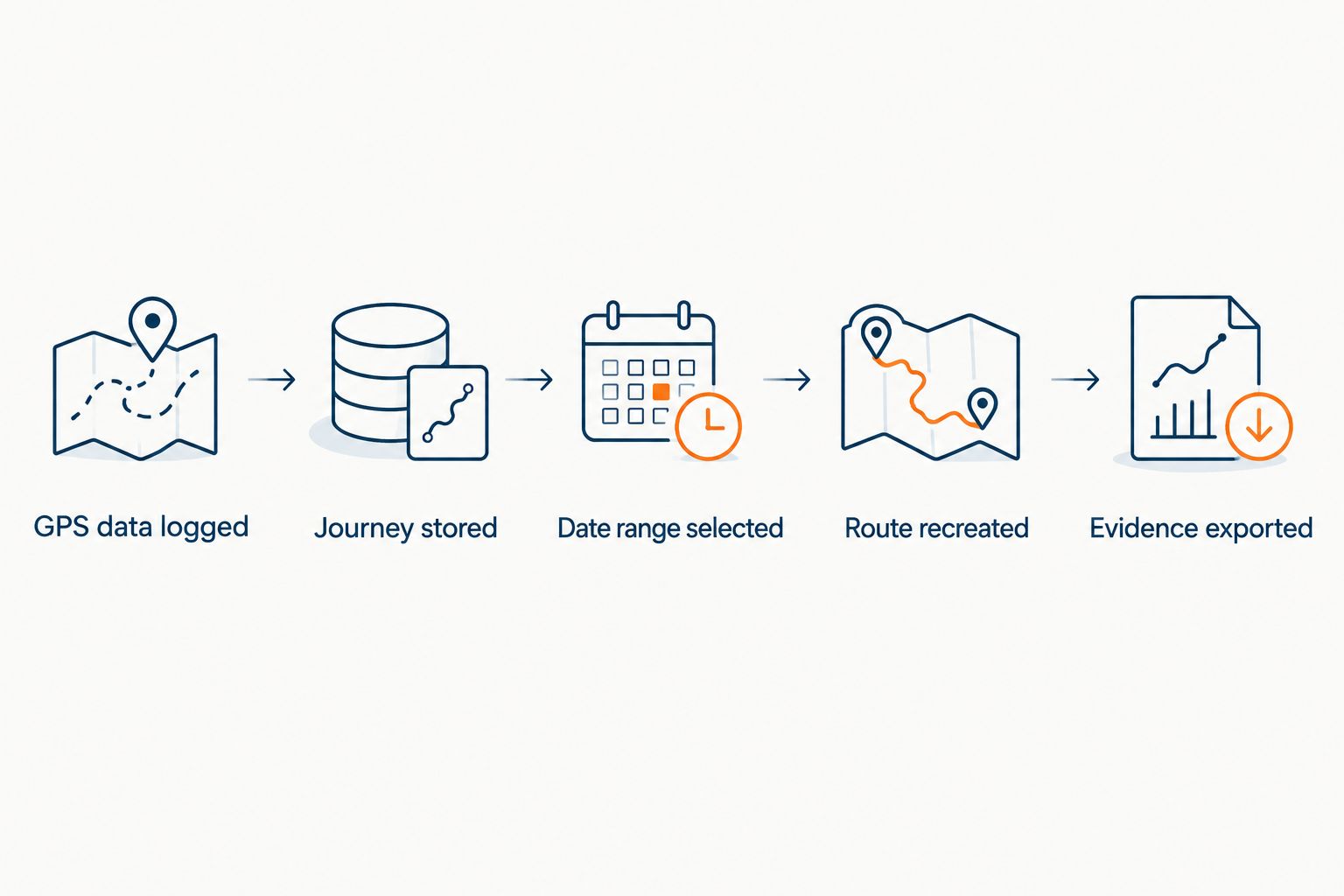
In practice, it follows a simple sequence:
- The tracking unit logs GPS position, speed and timestamps continuously while the vehicle is moving.
- That data is stored against the vehicle in the fleet management portal.
- The manager selects a vehicle and a date or time range.
- The portal recreates the route on a map, showing the path driven, stops made and how long each stop lasted.
- The manager can review the journey on screen or export it as a record for HR, a customer query or an insurance query.
No camera footage is involved at any point. Route playback is a map-based reconstruction of GPS data, not a video.
Live tracking vs route playback vs journey history
These three features sit inside the same fleet tracking system but answer different questions. Confusing them is the most common reason managers think they are missing a feature they already have.
| Feature | What it shows | Best for |
|---|---|---|
| Live tracking | Real-time vehicle position on the map right now | Best for immediate dispatch and locating a vehicle mid-shift |
| Route playback | A recreated past journey with stops, speed and timing | Best for investigating one specific trip after the fact |
| Journey history reports | Aggregated trip data across days, weeks or months | Best for spotting mileage trends and utilisation patterns |
A fleet manager checking today's van run needs live tracking. A fleet manager checking why a delivery ran two hours late last Thursday needs route playback. A fleet manager building a quarterly utilisation report needs journey history. FleetTracker covers all three from the same portal, so managers are not switching between separate tools for each question.
Why fleet managers use route playback
Route playback earns its place in daily fleet management because it answers questions other records cannot, quickly and without ambiguity.
- Customer dispute resolution. A customer claims a driver never arrived. Route playback shows the exact arrival and departure time at that address.
- Mileage claim verification. Route playback confirms whether a claimed business journey actually happened as described, supporting audits of business mileage claims rather than relying on a driver's log.
- Driver coaching evidence. Reviewing an actual route alongside speed data gives a manager something concrete to discuss, rather than a vague concern.
- Incident and complaint investigation. A recreated route with timestamps is far harder to dispute than a driver's recollection of events.
- Compliance records. For regulated fleets, a stored, reviewable journey record supports internal audits and external queries.
- Route efficiency review. Comparing planned versus actual routes highlights unnecessary detours or excessive idle time at stops.
None of these depend on live monitoring. Route playback works after the fact, which is exactly when most disputes and questions actually arise.
Is fleet route playback the same as live GPS tracking?
No. Live GPS tracking shows where a vehicle is right now; route playback recreates where it has already been. A fleet using only live tracking has no way to answer a question about yesterday's journey once the vehicle has moved on, which is why route playback matters as a separate capability inside the same system.
Does fleet route playback include dash cam footage?
No, route playback is built from GPS journey data alone and includes no video. Recorded footage of an incident, needed to dispute a false insurance claim with visual evidence, requires a separate camera system such as SmartCam 4G, accessed on demand through the customer portal rather than as a live stream.
How long is route and journey data stored for UK fleets?
There is no single retention period set in UK law for fleet telematics data, so how long route and journey history stays available depends on the provider and the plan. Fleet managers who need a specific retention window for compliance or evidence purposes should check current terms directly, and can review general considerations around vehicle telematics data retention before relying on stored records for a formal dispute.
FAQ
What is fleet route playback?
Fleet route playback is a recreation of a vehicle’s past journey built from stored GPS data, showing the route driven, stops made and how long the vehicle stood at each point. It is reviewed after the journey has finished, unlike live tracking.
Is route playback the same as live GPS tracking?
No, live GPS tracking shows current vehicle position while route playback recreates a completed journey. Both features typically sit inside the same fleet tracking portal, such as FleetTracker.
Does fleet route playback show video footage?
No, route playback is map-based and built from GPS data only. Recorded video evidence needs a separate camera system such as SmartCam 4G, accessed on demand rather than streamed live.
Can route playback help resolve a customer complaint?
Yes, route playback shows the exact arrival time, departure time and route taken for any completed journey, which settles most timing disputes without relying on a driver’s account.
Does route playback require a camera to be fitted?
No, route playback works from GPS journey data alone through a vehicle tracking unit, with no camera hardware required.
Can route playback verify a mileage claim?
Yes, route playback shows whether a claimed journey actually took place as described, which supports checking business mileage claims against real GPS records.
How long is fleet journey data stored?
There is no universal UK retention period for fleet telematics data, so storage length depends on the provider and plan. Check current terms directly with the fleet tracking provider.
Which Crystal Ball product includes route playback?
FleetTracker records journey history and route playback as part of its core fleet tracking and reporting features, alongside live GPS tracking and geofence alerts.
One last thing
The fleets that get the most value from route playback are not the ones reviewing every journey. They are the ones who only pull it up when a question comes in, a complaint, a mileage query, a timing dispute, and have it answer the question in minutes rather than starting an argument based on memory. Pairing route playback with useful geofence alerts means fewer questions arise in the first place, because the manager already knows when a vehicle entered or left a site.
Contact Crystal Ball directly to discuss how FleetTracker's route playback and journey history features fit a specific fleet, rather than relying on a generic feature list.
Contact Crystal Ball to talk through route playback and journey history for a specific fleet.
Explore the relevant Crystal Ball solution

Crystal Ball FleetTracker
Live vehicle location, journey history, geofences, supported alerts, mileage, utilisation and fleet records.
Related guides