 Get in Touch
Get a Quote
Get in Touch
Get a Quote

On demand dash cam footage from SmartCam 4G lets you pull recorded video for a specific incident window through the customer portal, rather than watching a live stream, so you can attach clear evidence to an insurance claim within minutes of logging in. The detail most fleet managers miss: footage only helps a claim if you request it before the retention period passes and if the camera covering that angle was actually recording at the time.
- On demand dash cam footage means recorded clips pulled through a portal, not a live stream.
- SmartCam 4G footage is retrieved for a specific incident window and attached to a claim or FNOL.
- Camera configuration and retention windows decide how useful the footage actually is.
- On demand dash cam footage supports a claim but does not replace the driver’s own incident report.
Why this matters
A disputed insurance claim without independent evidence usually comes down to one driver's word against another's. Recorded video from a fleet dash cam changes that conversation, provided someone can find the right clip quickly and hand it over in a usable format.
SmartCam 4G is built around this exact problem: high-quality footage is recorded continuously in the vehicle and held so it can be reviewed on demand through the customer portal when an incident happens. That is a different model from a system that streams live video to an office screen, and it is worth understanding before you rely on it during a claim. If you are also weighing up whether recorded footage stands up in a genuine dispute, dispute a false insurance claim with the right footage rather than assuming the insurer will take a driver's account at face value.
How to use SmartCam 4G on-demand footage for insurance claims
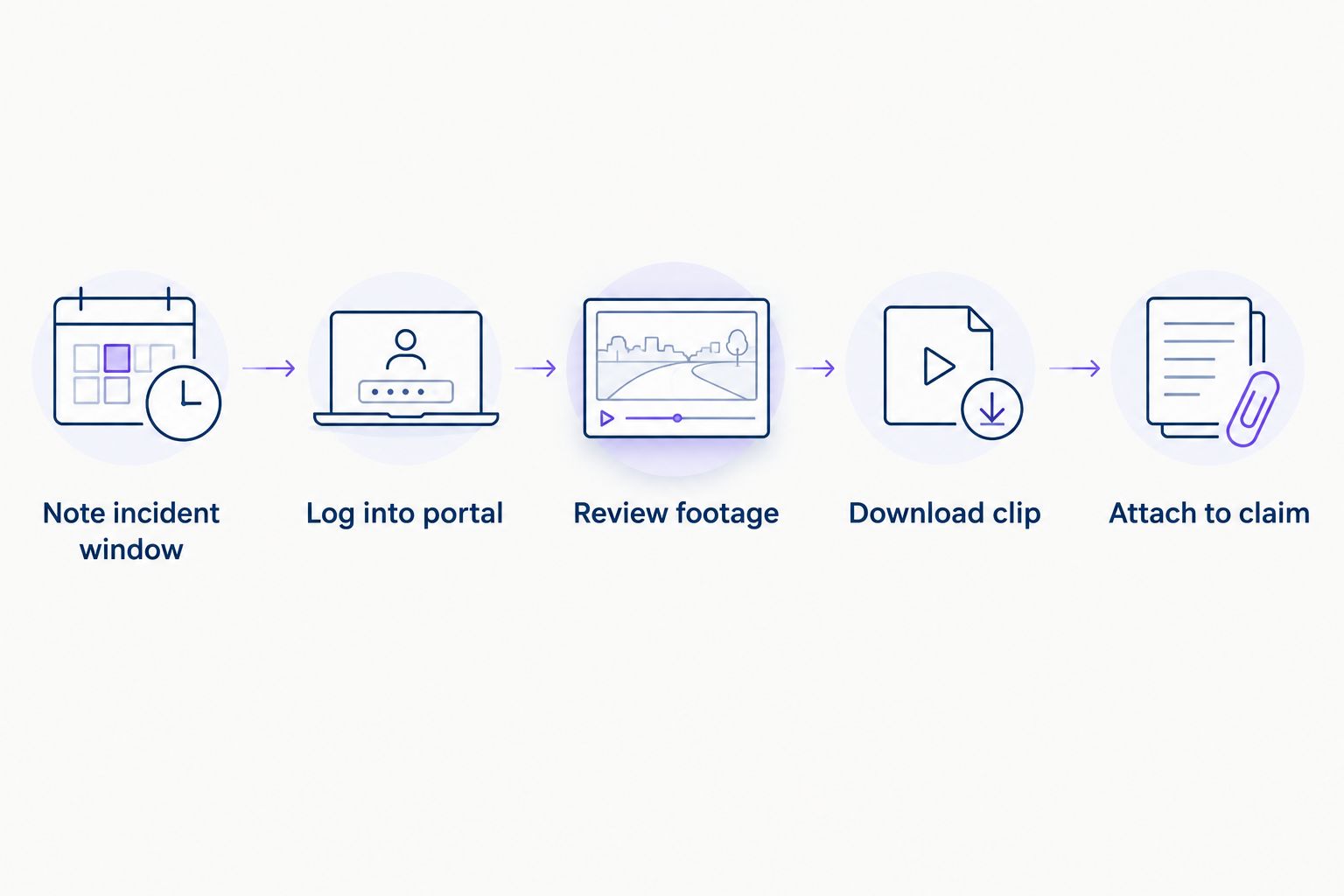
The process is the same whether the incident is a minor bump in a car park or a disputed collision on the motorway. Follow these steps as soon as you know a claim is likely.
- Note the incident window. Get the date, approximate time and location from the driver, the fleet record or a third party report. On-demand retrieval works from that window, so vague timing slows everything down.
- Log into the SmartCam 4G customer portal. Locate the vehicle and the relevant journey. The SmartCam 4G customer portal is where recorded footage and any supported alerts for that vehicle sit together.
- Review the footage before you download it. Check the angle actually covers the incident. A forward-facing clip will not show what happened behind the vehicle unless additional cameras were fitted and configured for that.
- Download the clip and attach it to the claim. Send it to your insurer or claims handler alongside the driver's written account and any journey data from tracking.
- Keep your own copy. Store it under your fleet's dash cam policy in case the insurer, a solicitor or the other party's insurer asks for it again later in 2026 or beyond.
What "on demand" actually means
SmartCam 4G does not push a continuous live video feed to a screen in your office. Footage is recorded in the vehicle and held so a fleet manager or authorised user can go into the portal, find the relevant window and pull it out when it is needed. That distinction matters for claims: you are retrieving stored evidence, not watching an incident unfold in real time.
It also means the request has to happen at your end. Nobody is monitoring a live feed and flagging the clip for you automatically. Understanding how SmartCam 4G incident alerts work helps you know which events are likely to have a usable clip waiting before you go looking for one.
What decides how useful the footage is
Not every claim ends up with clean, decisive video. A handful of factors decide whether the footage you pull actually settles the argument.
- Camera configuration. A forward-facing-only setup will not show a rear-end shunt or a side impact unless driver-facing, rear or side cameras were fitted and confirmed for that vehicle.
- How quickly you request it. Footage sits within a defined retention period. Wait too long after the incident and the clip you need may already have been overwritten.
- Portal access rights. Someone in the business needs the right login and permission level to find and download the footage without waiting on a third party.
- 4G connectivity at the time. SmartCam 4G relies on a mobile connection to sync and make footage available in the portal, so a dead zone at the incident location can delay upload.
- Whether the incident triggered a supported alert. Events tied to a recognised trigger, such as harsh braking or unexpected movement, are easier to locate than a quiet manoeuvre nobody flagged.
- How the claim is documented alongside it. Footage backs up a written incident report; it rarely replaces one entirely.
Does SmartCam 4G stream live video during an incident?
No, SmartCam 4G does not stream live video during an incident. Footage is recorded in the vehicle and made available on demand through the customer portal after the event, which is why the incident window and camera angle need to be confirmed before you go looking for a clip.
How long does SmartCam 4G keep footage for an insurance claim?
Retention depends on the fleet's own dash cam policy and the arrangement in place, and UK law does not set one universal retention period for fleet dash cam footage. Check current retention terms and dash cam footage retention rules for UK fleets rather than assuming a clip will still be there weeks after the fact.
Can on-demand footage help dispute a false insurance claim?
On-demand footage can help dispute a false insurance claim by showing what actually happened at the incident window, provided the right camera was recording the relevant angle. It works alongside the driver's account and journey data, not instead of them, and a weak or poorly angled clip will not automatically win a dispute on its own.
Who can access SmartCam 4G footage in a fleet?
Access depends on the portal permissions set up for the account, so a fleet manager typically controls who can view, download or share footage. Reviewing those permissions before an incident happens is more useful than trying to sort out access mid-claim.
Does on-demand footage work the same way for vans and HGVs as cars?
The on-demand retrieval process through the SmartCam 4G portal works the same way across car, van and HGV fleets, though camera configuration can differ by vehicle type. Larger commercial vehicles often need wider coverage, which is a separate conversation from the core on-demand footage process itself.
On demand dash cam footage only earns its keep if someone knows how to find it before the retention window closes.
On demand dash cam footage is one part of a wider evidence chain, not a replacement for a properly filed incident report and driver statement. Treat SmartCam 4G footage as supporting evidence that strengthens a claim, alongside journey data, timestamps and the driver's own account, rather than the single deciding factor.
FAQ
What is on demand dash cam footage?
On demand dash cam footage is video recorded by the vehicle’s camera and stored so it can be retrieved through a portal when needed, rather than streamed live. SmartCam 4G works this way, holding footage until an authorised user logs in and pulls the relevant clip.
Does SmartCam 4G record all the time or only during incidents?
SmartCam 4G records continuously and holds the footage for retrieval, which is separate from any supported incident alerts that flag specific events. That is why a manager can go back and find footage from a window that was not flagged as an incident at the time.
How quickly can I get footage after an incident?
You can typically log into the SmartCam 4G customer portal and search for footage as soon as the vehicle has synced over its 4G connection. Delays usually come from poor mobile coverage at the location or not knowing the exact incident window.
Can dash cam footage lower my fleet insurance premium?
Crystal Ball does not guarantee lower insurance premiums from fitting a dash cam, since acceptance and pricing decisions sit with individual insurers. Check with your insurer directly about how they treat recorded video evidence and telematics data.
What happens if the footage does not cover the incident angle?
If the camera configuration does not cover the angle involved, the claim relies on the driver’s account, any witness statements and journey data instead. This is why confirming camera coverage on a vehicle is worth doing before an incident, not after.
Is on demand footage the same as live tracking?
No, on demand footage is recorded video retrieved after the fact, while live tracking shows a vehicle’s current location and movement in real time. SmartCam 4G combines both tracking and recorded footage in one system, but they answer different questions.
Who decides how long footage is kept?
Footage retention is set by the fleet’s own dash cam policy and agreement, since UK law does not fix one universal retention period for fleet dash cam footage. Review your current terms so you know the window you have to act in after an incident.
One last thing
The single biggest reason fleets lose useful footage is not a technical failure, it is timing. Nobody logs into the portal until the claim letter arrives, by which point the clip may already have rolled out of the retention window. Build a habit of pulling and saving the footage the same day an incident is reported, not the week the insurer asks for it.
Request a demo to see how SmartCam 4G’s on-demand footage and portal access work for a specific fleet.
Explore the relevant Crystal Ball solution

SmartCam 4G Fleet Dash Cam
Integrated video telematics
On-demand footage, integrated tracking, incident evidence and digital vehicle checks where configured.
PRICE PROVIDED BY QUOTE
Related guides