 Get in Touch
Get a Quote
Get in Touch
Get a Quote

London taxi and private hire dash cam approval is the process of confirming that a camera appears on Transport for London’s current list for your vehicle type, so the equipment you fit matches TfL’s published requirements. This guide shows you how to check any camera against that list in 2026, step by step, before you buy.
For a shorter version to keep in the cab or office, use the TfL-approved dash cam buying checklist.
- A TfL approved dash cam list is only useful if you check the exact model, version and vehicle category.
- Check TfL’s own current list first. A supplier’s brochure or an older blog is not proof of approval.
- Crystal Ball’s TfL-approved dash cam is a separate product from SmartCam 4G and the 360° Camera System.
- Confirm installation, data access and your data protection duties before signing an order in 2026.
Why checking matters for London taxi and private hire operators
A camera that looks right on a product page can still be the wrong one for a London licensed vehicle. Approval is tied to a specific system, not to a brand name or a general product type. Plenty of dash cams on the market are made for private cars and make no claim of TfL approval at all.
Operators also carry the cost of getting it wrong. A camera fitted in error may need replacing, and the vehicle may be off the road while that happens. A few minutes of checking before the order is cheaper than a second installation.
The approval picture can also change. TfL publishes the requirements, and the list you read in 2026 may not match the one a supplier used last year. Treat every claim, including ours, as something to verify against the official source on the day you buy.
Verdict: the safest way to use any TfL approved dash cam list is to check TfL’s current published list yourself, then match the exact model and version to the quote in front of you.
How to check a camera against the TfL approved dash cam list
Work through the six steps below in order. The manual route costs nothing and takes one sitting. A supplier can speed up the later steps, but should never replace the first ones.
Step 1: Confirm your vehicle type and category
Approval depends on what the vehicle is. A black cab, a private hire saloon and a van are not the same case. Decide this before you look at a single camera.
- Write down whether the vehicle is a licensed taxi, a private hire vehicle or something else.
- Note the make, model and year, as the fitting position can depend on them.
- Record who holds the licence: an owner-driver, a company or a fleet operator.
- Note whether you are fitting one vehicle or several, as this affects how you ask for a quote.
- Keep the licensing paperwork to hand when speaking to a supplier.
Step 2: Find the official TfL list and read the conditions
Go to Transport for London’s own published information on approved in-vehicle CCTV. Search for it by name rather than following a link in a supplier email. Read the conditions attached to the list as well as the list itself.
- Open TfL’s current published information on approved taxi and private hire CCTV.
- Note the date of the page or document you are reading.
- Read any conditions on vehicle type, fitting or data handling.
- Save a copy or screenshot with the date, so you can show what you relied on.
- Do not rely on an old blog post, a forum thread or a screenshot you were sent.
This is where most checks should start and stop for the question “is this camera approved?”. If a model is not on TfL’s current list, a supplier’s wording does not change that.
Step 3: Match the exact model and version
A brand appearing on the list does not mean every camera that brand sells is approved. Compare the full product name, and any version or configuration detail, word for word.
- Copy the exact product name from the quote or product page.
- Compare it with the name on TfL’s list, character by character.
- Ask which version or configuration the approval covers.
- Check whether extra cameras, audio options or accessories fall inside the approved set-up.
- Ask the supplier to confirm the match in writing.
Mark optional extras as optional on your own notes. An optional feature is not automatically part of the approved system.
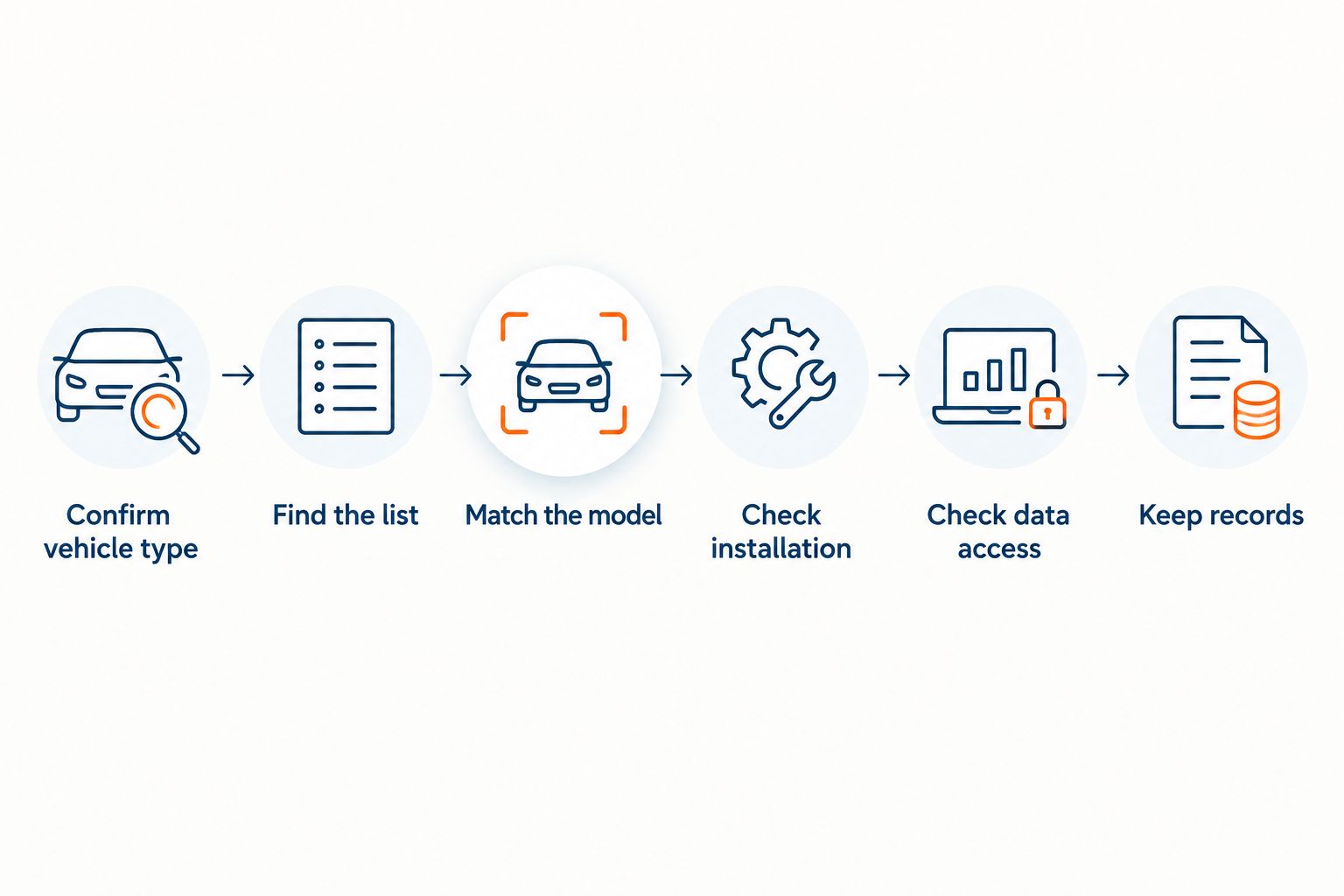
Step 4: Check how the camera will be installed
An approved camera still has to be fitted properly. Ask who fits it, where, and how the work is recorded.
- Ask who carries out the installation and where it takes place.
- Ask how long the vehicle will be off the road for the work.
- Ask what paperwork you receive after fitting.
- Check that the fitting position matches the approved set-up.
- Ask what happens if the camera needs servicing or replacing later.
If you want a ready-made list of questions, use the guide to questions for a TfL-approved dash cam installer.
Step 5: Check how footage is stored and accessed
Approval covers the camera. It does not answer who can see the footage, how it is protected or how long you keep it. Ask these questions before you buy, not after the first incident.
- Ask where footage is stored and who can retrieve it.
- Ask how a request for footage is handled and who authorises it.
- Ask how footage is protected against unauthorised viewing.
- Check what the camera records, including whether audio is involved.
- Agree your own retention approach, as UK law does not set one universal period for fleet camera footage.
The practical side of retrieval is covered in how TfL-approved dash cam footage access works. Data protection duties sit with the operator, so read the Information Commissioner’s Office guidance on video and audio surveillance as well.
Step 6: Keep a record of your checks
Write down what you checked and when. If a question arises later, a dated file is far stronger than a memory.
- Keep the dated copy of TfL’s list or page.
- Keep the supplier’s written confirmation of the model and version.
- Keep the installation paperwork for each vehicle.
- Keep your data protection decisions, including who may view footage.
- Diary a re-check, as published requirements can change.
Which options belong on your shortlist
Not every camera Crystal Ball sells is a taxi or private hire camera, and the same is true of every other supplier. This table separates the options so you do not compare unlike products.
| Option | Best for | Key limitation |
|---|---|---|
| Camera taken from TfL’s current official list | Operators who need documented approval | The list and its conditions can change, so record the date you checked |
| Crystal Ball TfL-approved dash cam | Operators who want a supplier that confirms approval in writing for a named category | Only suitable for the category the current TfL approval confirms |
| SmartCam 4G | Car and van fleets that want tracking plus video telematics | A separate product; it is not a substitute for a TfL-approved taxi or private hire camera |
| 360° Camera System | Commercial vehicles needing multi-camera visibility | Built for commercial vehicles, not for the London taxi or private hire category |
| Consumer dash cam | Private cars | Makes no claim of TfL approval |
Crystal Ball keeps these products apart on purpose. The TfL-approved dash cam, SmartCam 4G and the 360° Camera System each answer a different need. They can sit side by side in a mixed operation, but features do not carry across from one to another.
Verdict: Crystal Ball’s TfL-approved dash cam is best for operators who want a camera confirmed against TfL’s current approval for their vehicle category, with the exact model and version confirmed in writing before you order.
What Crystal Ball adds, and what it does not
Crystal Ball is a family-run UK fleet technology provider with its own development team and human support. Its TfL-approved dash cam is a distinct product. Ask Crystal Ball directly, not a blog, to confirm the model name, vehicle category, camera views, audio, storage and data access.
If your operation also runs vans or cars, a different product may fit that part of the fleet. For example, 4G dash cams for taxi and private hire fleets explains how connected cameras fit alongside licensing needs. Read it with the boundaries above in mind, because a SmartCam 4G feature does not belong to the TfL-approved camera.
The price for the TfL-approved camera comes with the quote, so ask for it on the day you order. Check what the figure includes, such as VAT and installation, before you compare quotes.
Common mistakes London operators make
- Trusting an old list. A screenshot from an earlier year may no longer match TfL’s current published list. Check it fresh in 2026 and keep the date.
- Matching the brand, not the model. Approval applies to a specific system. A familiar brand name proves nothing on its own.
- Mixing up product types. A commercial vehicle camera system, a fleet dash cam and a taxi camera are different products. Do not assume approval carries across.
- Ignoring the footage side. Approval does not decide who sees recordings or how long you keep them. Set a clear policy before the camera goes in.
- Skipping the paperwork. Without a dated record of the list, the model name and the installation, you cannot show later what you relied on.
When you reach the quotation stage, the TfL-approved dash cam quote checklist helps you compare like with like.
FAQ
Where can I find the official TfL approved dash cam list?
Transport for London publishes its own information on approved in-vehicle CCTV, so start there rather than with a supplier. Search for the TfL page by name, note the date you read it and save a copy.
Is every dash cam TfL approved?
No. Most dash cams sold for private cars make no claim of TfL approval. Approval applies to specific systems, so check the exact model against TfL’s current published information.
Does a supplier’s word prove a camera is approved?
No. A supplier’s statement is a starting point. Confirm the exact model and version against TfL’s current published list and ask for the match in writing.
Is the Crystal Ball TfL-approved dash cam the same as SmartCam 4G?
No. They are separate products. The TfL-approved dash cam covers the category the current TfL approval confirms, and SmartCam 4G features do not transfer to it.
Does TfL approval decide how long I keep footage?
No. Approval concerns the camera system. UK law does not set one universal retention period for fleet camera footage, so you decide a justified approach and follow data protection guidance.
How often should I re-check approval?
Re-check whenever you order new equipment and on a regular diary date. Published requirements can change, so a check made in 2026 may not hold for later purchases.
What should I ask an installer before booking?
Ask who fits the camera, where, how long it takes and what paperwork you receive. Also ask how servicing and replacement work if a fault develops later.
One last thing
Keep the dated copy of TfL’s list alongside each vehicle’s installation paperwork. If a question ever arises about what you relied on in 2026, one folder with the list, the written model confirmation and the fitting record answers it in minutes.
If you are ready to specify an approved camera for your vehicles, request a quote and confirm the model and category with the Crystal Ball team.
Explore the relevant Crystal Ball solution
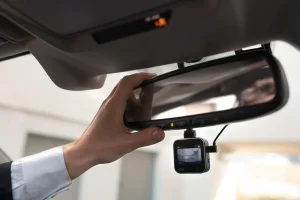
Crystal Ball TfL-Approved Camera System
Confirm the exact camera model, approved category, fitting and access process before installation.
PRICE PROVIDED BY QUOTE
Related guides