 Get in Touch
Get a Quote
Get in Touch
Get a Quote

Crystal Ball SmartCam 4G combines vehicle tracking with video telematics, so supported incident detection and recorded evidence sit in one connected system. This guide explains what a G-sensor does, what happens to footage afterwards, and what to confirm before you buy a dash cam for automatic incident upload in 2026.
- SmartCam 4G suits fleets that need tracking plus recorded incident evidence in one system.
- A G-sensor detects sudden force; it does not decide how your footage is stored, shared or retained.
- When its G-sensors detect a collision or harsh braking, SmartCam 4G uploads the incident footage to the cloud automatically and alerts the manager.
- FleetTracker and the 360° Camera System answer different needs; check which one fits your vehicles.
- Other SmartCam 4G footage is retrieved on demand through the portal or Manager app, so nobody has to visit the vehicle.
Why this matters in 2026
After a collision, the first question is usually what actually happened. A recording answers it faster than recollection does. For a fleet manager, the harder question is how that recording reaches you without someone pulling a memory card from a vehicle.
The phrase “automatic incident upload” is used loosely by dash cam sellers. It can mean the camera locks a clip, sends an alert, uploads the clip, or simply makes it available to request. Those are different behaviours with different admin costs. Treat the wording as a claim to verify, not a feature name to accept.
SmartCam 4G does all four. Its G-sensors and motion detection give event-triggered recording, so the camera starts recording as soon as it senses an accident, an impact or attempted theft. Collision footage uploads to the cloud automatically the moment the G-sensors trigger, over an encrypted 4G connection, and the manager gets an alert with the footage on a computer or the SmartCam Manager app, so the full picture arrives within minutes. Any other footage stays retrievable on demand by authorised users, from any location.
What a G-sensor actually does
A G-sensor is an accelerometer. It measures sudden changes in force on the vehicle, such as a heavy impact or a hard stop. In a dash cam it acts as a trigger.
What the trigger can do depends on the product. Common uses across the dash cam market are:
- Marking the surrounding recording as an event so it is easy to find.
- Protecting that recording from being overwritten in normal use.
- Raising an alert to a manager where the system supports it.
A G-sensor does not prove fault. It records that something happened. The video and the tracking data around it show the context: where the vehicle was, how it was moving and what the camera saw.
Sensitivity matters too. Set too low, minor knocks are missed. Set too high, potholes and speed humps create false events. Ask any supplier how sensitivity is set and who can change it. Do not assume a figure; the right answer depends on vehicle type and routes.
What makes the best dash cam for automatic incident handling
Use these criteria to audit any shortlist before you look at the table.
- Incident detection: the system must detect an event and mark the recording. SmartCam 4G uses G-sensors to detect collisions and harsh braking.
- Evidence access: you should be able to reach the footage without visiting the vehicle. Ask how, and how quickly.
- Connection: a 4G connection matters if you want evidence retrieved remotely rather than collected at the depot.
- Linked data: location, speed and journey data should sit alongside the video.
- Alerts: know which alerts are supported today, not which are planned.
- Control and privacy: who can view footage, and how long is it kept? UK law does not set one universal fleet dash cam retention period, so your policy decides.
Options at a glance
| Option | Best for | Standout feature | Key limitation |
|---|---|---|---|
| SmartCam 4G | Cars, vans and mixed fleets needing tracking plus video evidence | Automatic upload of incident footage when the G-sensors trigger, plus on-demand access | Extra cameras are optional and depend on configuration |
| 360° Camera System | HGVs and large commercial vehicles needing surrounding visibility | Configurable multi-camera commercial-vehicle CCTV | A separate product; it does not carry SmartCam tracking, portal or alert functions |
| FleetTracker | Fleets needing location, journeys and records | Live GPS tracking, reporting and fleet records | No camera footage or video telematics |
All three are quote-led. Prices are not shown here; request a quote for your vehicles.
SmartCam 4G: connected tracking and incident evidence
SmartCam 4G is the product to consider when one system should cover where a vehicle was and what happened around it. It includes a forward-facing camera, and optional driver-facing, rear or side cameras where confirmed for your configuration.
SmartCam 4G pros:
- Tracking and video telematics in one connected ecosystem.
- Collision footage uploads automatically when the G-sensors trigger, with a real-time alert to the manager.
- Other footage accessed on demand from any location through the portal or app.
- Driver scoring on speeding, idling and harsh acceleration, braking and cornering.
- Digital vehicle checks and defect reporting for compliance records.
SmartCam 4G cons:
- Pricing is quote-led, so there is no public price to compare.
- Extra cameras are optional and depend on configuration.
- Digital checks support, but do not replace, your legal inspection and repair duties.
How incident recording and alerts work in practice is covered in how SmartCam incident recording alerts work. For claims, see SmartCam on-demand footage for insurance claims.
Best for: fleets that want incident evidence linked to tracking data.
360° Camera System: surrounding visibility on large vehicles
The 360° Camera System is multi-camera commercial-vehicle CCTV. Typical views include forward, in-cab, near-side, right-side and rear, depending on the selected configuration. A monitor, audible alarms or proximity sensors apply only where your configuration confirms them.
360° Camera System pros:
- Visibility around the whole vehicle, useful for blind-spot awareness.
- Recorded evidence for incident investigation.
- Suited to HGVs and large vehicles.
360° Camera System cons:
- It is not SmartCam 4G, so do not expect SmartCam portal, alert or driver score functions.
- It does not by itself establish DVS compliance. DVS equipment and permit rules are verified separately against current TfL requirements.
- Footage retrieval depends on the configuration.
Best for: HGV and large-vehicle operators that need coverage on every side rather than a single front camera.
FleetTracker: location and records without video
FleetTracker covers live GPS tracking, journey history and playback, geofences, mileage, vehicle utilisation, scheduled reports and fleet records, with Automatic Driver Recognition (ADR) available as a bolt-on. It is the simplest correct product when your problem is visibility rather than evidence.
FleetTracker pros:
- Journey and utilisation data for operational control.
- Scheduled reports and fleet records for vehicles and drivers.
- Supported alerts such as speeding.
FleetTracker cons:
- It provides no camera footage, video telematics or digital vehicle checks.
- It will not show you what happened in a collision, only where and how the vehicle moved.
Best for: fleets that need tracking and reporting without video.
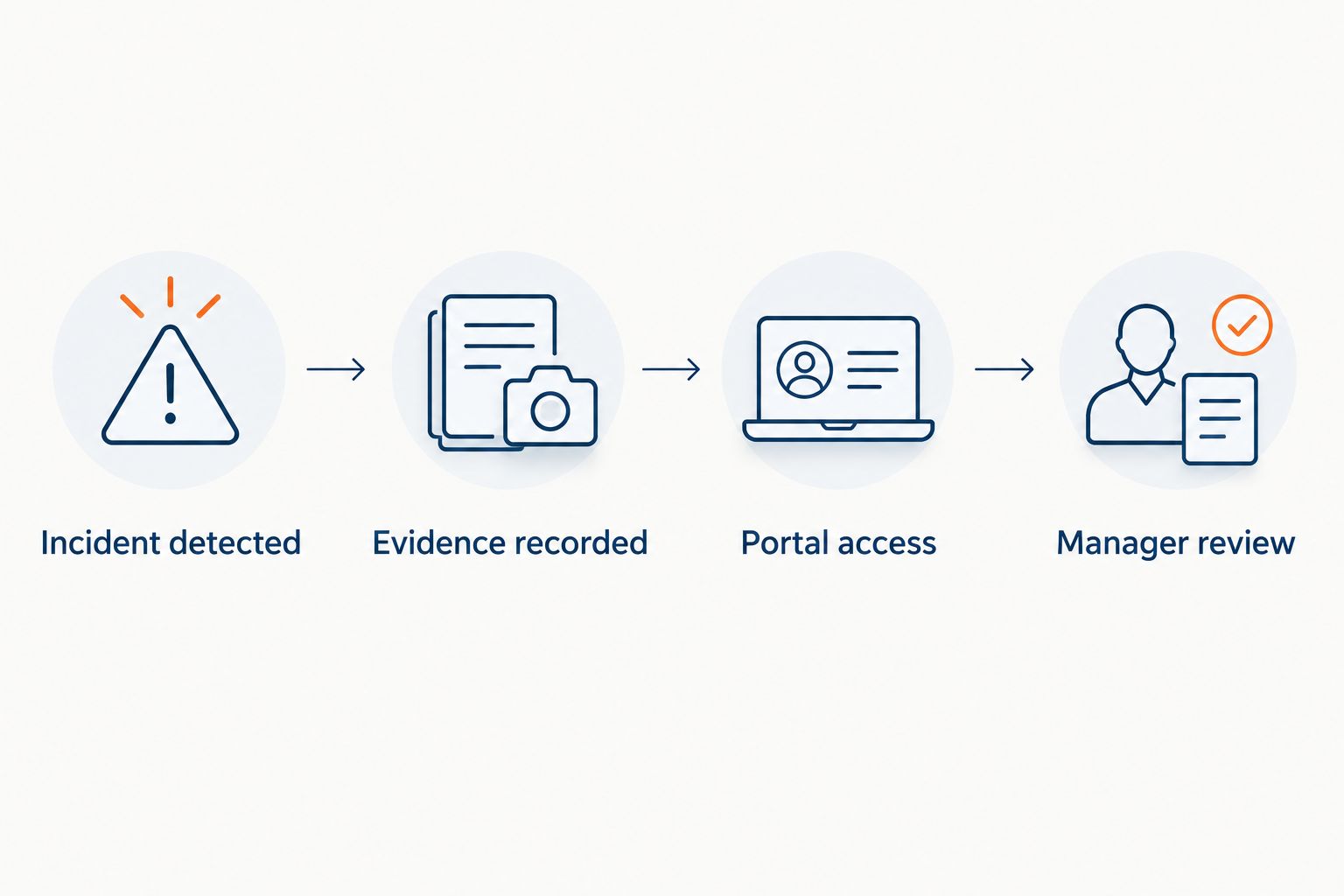
What happens after an incident is detected
Think of the sequence in four steps.
- Incident detected. The sensor or a supported alert condition flags the event.
- Evidence recorded. The camera captures the surrounding footage.
- Portal access. With SmartCam 4G, collision footage uploads automatically and the manager gets an alert; any other clip can be pulled up on demand through the portal or app.
- Manager review. Someone decides what to do: contact the driver, notify the insurer or keep the clip.
The gap most buyers miss is step three. A system that detects well but leaves footage trapped in the vehicle shifts the work to your depot. Ask what is retrievable remotely, what needs a visit, and who on your team holds access.
For the manager side of the workflow, see the SmartCam customer portal, footage and alerts.
Questions to put to any supplier
Before you commit to a dash cam with automatic incident handling, get written answers to these.
- Which events does the system detect today, and which are planned?
- What exactly happens to footage when an event is detected?
- Is footage reached remotely, and through what interface?
- Who in your business can view, download and delete clips?
- How is sensitivity set, and can it differ by vehicle?
- What data does the camera send over 4G, and what is stored locally?
If an answer relies on the word “AI”, ask the supplier to name the behaviour and show it on a current product page. Older wording about features that are “coming” is not proof they are available.
Data protection and retention
Video of people is personal data. Your business needs a lawful basis, clear signage or driver notice where relevant, and a retention rule it can defend. The ICO publishes guidance on data protection and monitoring workers, and it is the right starting point for your policy.
Decide how long incident clips are kept, who may access them and when they are deleted. Our guide to dash cam footage retention for UK fleets sets out the questions to settle. Write the policy before the cameras go in, and brief drivers on it.
How these options compare
The three options are compared against the criteria above: incident evidence, remote access, linked tracking data and fit for vehicle type. They are not competitors in a single category. They are distinct, complementary parts of a connected fleet technology range. Many fleets need only one. Add a second only when a separate need exists, such as surrounding visibility on an HGV.
Which option should you choose?
If you run cars and vans and want video evidence linked to tracking, start with SmartCam 4G. If your vehicles are HGVs or large commercial vehicles that need coverage on every side, look at the 360° Camera System. If you only need to know where vehicles are and how they are used, FleetTracker answers that without video.
If you are undecided, ask what question you will need answered after the first incident. If it is “what happened?”, you need video. If it is “where was the vehicle?”, you need tracking.
To see how the portal and incident workflow look on your own vehicles, request a demo from Crystal Ball.
FAQ
Does SmartCam 4G upload incident footage automatically?
Yes. When its G-sensors detect a collision, SmartCam 4G uploads the footage to the cloud automatically and alerts the manager on a computer or the SmartCam Manager app, so the full picture arrives within minutes.
What does a G-sensor do in a dash cam?
A G-sensor detects sudden force, such as an impact or hard stop. It acts as a trigger so the surrounding recording can be marked as an event. What happens next depends on the product.
Is a dash cam with automatic incident upload worth it for a fleet?
It is worth it when you need to reach evidence without visiting the vehicle. Confirm exactly what is uploaded, what is requested and who can access it before you buy.
Can FleetTracker show me incident footage?
No. FleetTracker provides tracking, journeys, reports and fleet records. It has no camera footage or video telematics. SmartCam 4G adds video.
Is the 360° Camera System the same as SmartCam 4G?
No. The 360° Camera System is separate multi-camera commercial-vehicle CCTV. SmartCam tracking, portal, alert and digital check functions do not transfer to it.
How long should a fleet keep incident footage?
UK law does not set one universal fleet dash cam retention period. Set a period your business can justify, write it into policy and follow ICO guidance.
Do digital vehicle checks replace legal vehicle inspections?
No. SmartCam digital vehicle checks support your records and defect reporting. They do not replace legal inspection, reporting, assessment and repair duties.
One last thing
Ask to see a real incident clip, from detection to portal, on a vehicle like yours before you sign. A working demonstration tells you more than any feature list. If a supplier cannot show it, treat the claim as unproven.
Explore the relevant Crystal Ball solution

SmartCam 4G Fleet Dash Cam
Integrated video telematics
On-demand footage, integrated tracking, incident evidence and digital vehicle checks where configured.
PRICE PROVIDED BY QUOTE
Related guides